Submit NMR spectra to Zenodo
Visit the NMRium dataset on Zenodo to browse submitted datasets.
Submit NMR spectra to Zenodo with direct integration into NMRium for interactive visualization and analysis. These tools enable the ultimate FAIR data submission for NMR datasets, making your research data Findable, Accessible, Interoperable, and Reusable.
You can check the result of such a submission on the Zenodo sandbox. Even though the data is hosted on Zenodo, the spectra can be displayed interactively in NMRium — the visualization loads the data directly from Zenodo.
About
Two tools are available to submit NMR spectra datasets to Zenodo while leveraging the power of NMRium for interactive, web-based visualization: a web application at https://zenodo-submit.nmrium.com/ and a command-line tool named zenodo-nmrium. Both produce exactly the same kind of Zenodo record.
Why FAIR Data Matters
Both tools ensure your NMR data follows FAIR principles:
- Findable: Your data is registered and discoverable on Zenodo
- Accessible: Data is freely available on the public internet
- Interoperable: Data is stored as a ZIP file containing the original NMR data, which works with NMRium and other tools
- Reusable: Rich metadata and open licenses facilitate reuse by others
The Ultimate Goal
Both tools enable a complete FAIR data workflow:
- Organize your data: Package each NMR sample in a folder or as a
.nmrium.zipfile - Store in Zenodo: Upload your data to Zenodo (sandbox for testing, production for publication)
- Interactive visualization: All data is directly accessible from Zenodo and can be viewed interactively in NMRium
- Table of contents: Navigate between multiple samples through a structured table of contents
- Community sharing: Join the NMRium community on Zenodo to discover and access all community-submitted datasets
Which tool should I use?
| Web application | Command-line tool | |
|---|---|---|
| Address | https://zenodo-submit.nmrium.com/ | zenodo-nmrium, run in a terminal |
| For whom | Anybody. Nothing to install, everything happens in the browser | People who are comfortable with a terminal, typically on Linux or macOS |
| Best for | Occasional submissions of a few samples | Large amounts of data, many samples, repeated or scripted submissions |
| Metadata | Filled in a form, remembered between sessions | Written once in an index.yml file next to the data |
| Data | Folders dropped on the page | A folder on your disk |
| Limits | At most 90 entries, 200 MB per entry | Limited only by your machine and by Zenodo |
Both need a Zenodo API token, and both can submit either to the sandbox or to the production Zenodo.
Get a Zenodo API token
- Sandbox (testing): https://sandbox.zenodo.org/account/settings/applications/tokens/new/
- Production: https://zenodo.org/account/settings/applications/tokens/new/
You must enable deposit:action and deposit:write permissions when creating the token.
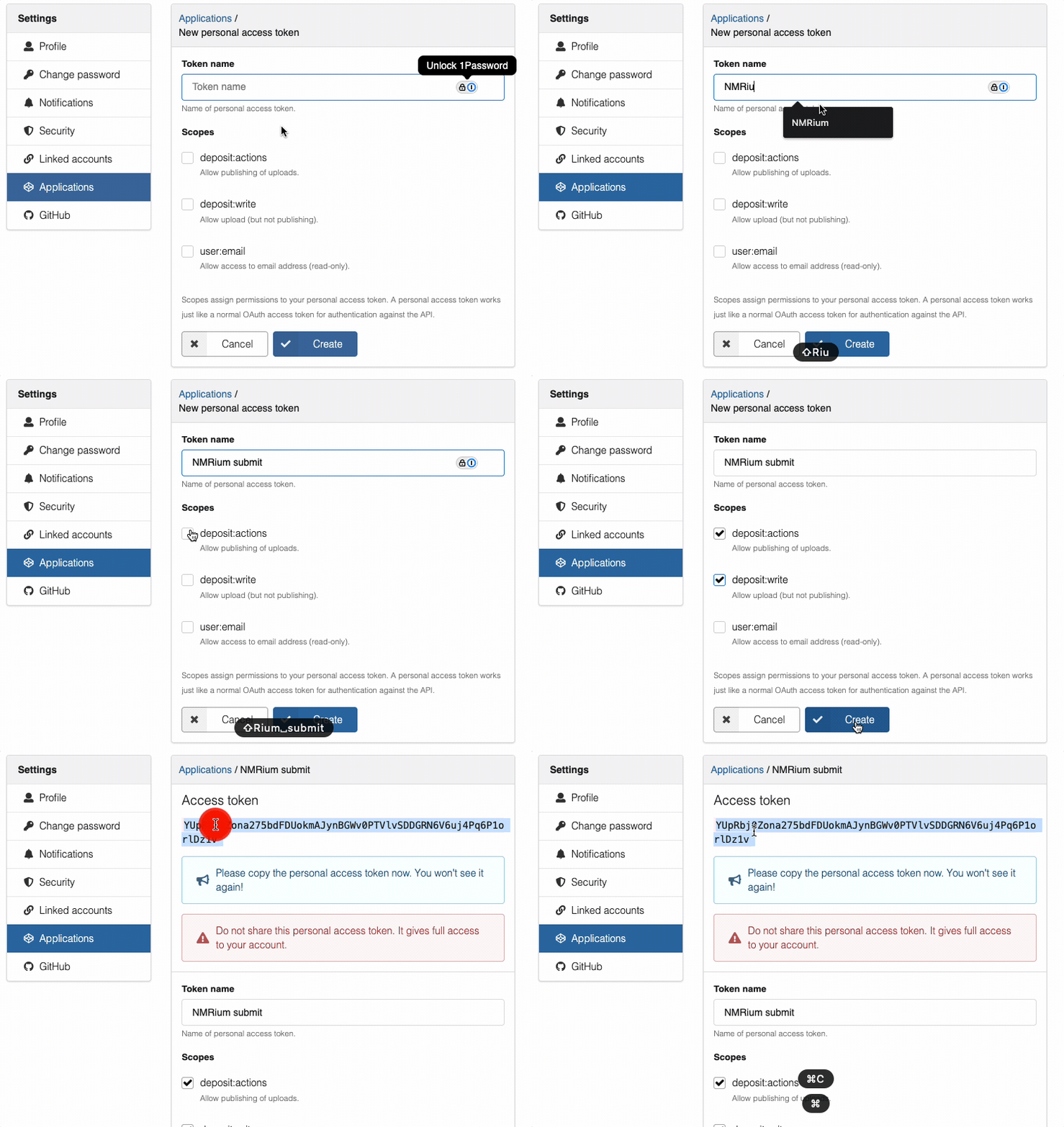
Sandbox and production are two independent services, with separate accounts and separate tokens. You will only see a token once, so save it in a secure location.
Submit with the web application
https://zenodo-submit.nmrium.com/ runs entirely in your browser. There is nothing to install, and your data and your token never transit through any server other than Zenodo itself.
1. Configure your token
Open the Settings panel at the top of the page. The Sandbox switch next to it selects the environment: switched on the record is created on sandbox.zenodo.org, switched off on the real zenodo.org. Paste the token of the selected environment in the token field; the application immediately checks it against Zenodo and tells you whether it is valid. The token is stored in your browser only, and each environment keeps its own token, so you can switch between sandbox and production without pasting it again.
Two other options are available in the same panel:
- Data Selection — which data NMRium displays:
FT only(default),FID only,Both FT and FID,Prefer FTorPrefer FID. - Auto-publish after upload — publish the record right away instead of leaving it as a draft that you can still review and edit on Zenodo.
2. Fill in the metadata
The form asks for the title (required), the authors with their affiliation and ORCID, the description, keywords, publication date, license and publisher. The description is written in a rich text editor supporting bold, italic, subscript, superscript and lists, which is convenient for chemical names and formulas.
The Access setting defines who may see the record: Public, Embargoed until a date you choose, or Restricted. A restricted record can still be shared through a secret link given to you after the submission.
Authors, description and settings are saved in the browser and restored the next time you come back.
3. Drop your NMR data
Drag and drop your data on the drop zone: one folder per entry of the future table of contents, exactly like the folder structure described in Organize Your Data. Each dropped folder is converted in the browser to a .nmrium.zip archive; you may also drop .nmrium.zip files that you saved from NMRium.
| Format | File types |
|---|---|
| Bruker | TopSpin directories (1D and 2D) |
| JEOL | .jdf files |
| JCAMP-DX | .jdx, .jcamp files |
| NMReDATA | .nmredata files |
| Structures | Molfile, SDF |
Every entry appears in a table with its name, number of files, size and status. From there you can download the generated .nmrium.zip to check it, or remove the entry.
4. Preview
The Preview tab shows the table of contents of the future record and displays the spectra in an embedded NMRium. This is the moment to verify that every sample was correctly converted, that the structures are present and that the processing is the one you expect.
5. Submit
Click Submit to Zenodo. The application creates the deposit, uploads every archive, generates the table of contents and sets the metadata. A link to the record is displayed at the end, and the description of the record contains the link that opens the dataset interactively in NMRium.
Every submission is kept in the History tab, from which the metadata of a previous submission can be reloaded in one click to prepare the next one. A Help tab explains each field of the form.
The command-line tool
The zenodo-nmrium command-line tool does the same job from a terminal. It is the better choice when you have a large amount of data, many samples to submit at once, or when you want to repeat the submission from a script.
Command-line installation
Option 1: Pre-built Binaries
Pre-built binaries are available for macOS ARM64 and Linux x64. This option is useful if you don't have Node.js installed and are working on macOS ARM64 (Apple Silicon) or Linux Intel (x64).
macOS ARM64 (Apple Silicon)
curl -o zenodo-nmrium https://www.lactame.com/lib/zenodo-nmrium/HEAD/zenodo-nmrium-darwin-arm64 && chmod 555 zenodo-nmrium
Then use it:
./zenodo-nmrium <path> [options]
Linux x64 (Intel)
curl -o zenodo-nmrium https://www.lactame.com/lib/zenodo-nmrium/HEAD/zenodo-nmrium-linux-x64 && chmod 555 zenodo-nmrium
Then use it:
./zenodo-nmrium <path> [options]
Other Platforms
For other platforms (Windows, macOS Intel, ARM Linux, etc.), use Option 2 (npm) instead.
Option 2: npm Package
If you have Node.js installed, you can use the npm package.
Using npx (Recommended - No Installation Required)
npx zenodo-nmrium <path> [options]
This downloads and runs the latest version without installing anything.
Global Installation
npm install -g zenodo-nmrium
Then use it:
zenodo-nmrium <path> [options]
Command-line quick start
1. Organize Your Data
Create a folder with the following structure:
- One folder or
.nmrium.zipfile per item in your menu/table of contents - Each folder/ZIP should contain all NMR data for a sample or group of samples
- One
index.ymlmetadata file at the root describing your entire dataset
Example folder structure:
my-nmr-dataset/
├── index.yml                    # Dataset metadata (required)
├── sample_1/                    # First sample (name will be reused in the table of content)
│   ├── structure.mol            # Optional: chemical structure file (molfile format)
│   ├── 12/                      # Experiment number of a native Bruker folder
│   │   ├── fid
│   │   ├── acqu
│   │   ├── acqus
│   │   ├── pdata/               # Processed data folder
│   │   │   └── 1/
│   │   │       ├── proc
│   │   │       ├── procs
│   │   │       └── ...
│   │   └── ...
│   ├── 13/                      # Another experiment
│   └── ...
├── sample_2.nmrium.zip          # Second sample was processed using NMRium. It could contain assignment
├── sample_3/
│   ├── structure.mol            # Optional: chemical structure file (molfile format)
│   └── spectrum.jdx             # JCAMP-DX file (e.g., exported from TopSpin using `tojdx` or from Mnova with peak assignments)
└── ...
Each sample folder may optionally contain a structure.mol file (MOL format) if the chemical structure is known. This allows NMRium to display and analyze the structure alongside the NMR spectra.
2. Create the Metadata File (index.yml)
The index.yml file is required and should be placed at the root of your dataset folder. It contains metadata about your entire dataset.
You can use the interactive editor below to tweak the example metadata and validate the YAML syntax.
Metadata Fields
| Field | Type | Required | Description |
|---|---|---|---|
title | String | Yes | Title of your NMR dataset |
description | String (HTML) | Yes | Dataset description as a string in HTML format |
copyright | String | Yes | License identifier (default: cc-by-4.0, e.g., cc0-1.0) |
keywords | Array | No | List of keywords for dataset discoverability |
authors | Array | Yes | List of dataset authors |
Author Fields
| Field | Type | Required | Description |
|---|---|---|---|
family-name | String | Yes | Author's surname |
given-name | String | Yes | Author's first name |
affiliation | String | No | Author's institutional affiliation |
orcid | String | No | Author's ORCID identifier (format: 0000-0000-0000-0000) |
3. Provide your Zenodo API Token
Create the token as described in Get a Zenodo API token, then give it to the tool.
You can provide your Zenodo API tokens in two ways:
Option 1: Command Line
Pass the token directly via the -t or --access-token option:
./zenodo-nmrium ./my-nmr-dataset -t YOUR_SANDBOX_TOKEN
Option 2: Environment Variables (.env file)
Store your tokens in a .env file. The tool will look for this file in one of three locations (in order):
.envin the current working directory.zenodo-nmriumin your home directory (~/.zenodo-nmrium).envin your home directory (~/.env)
Create a .env file with the following environment variables:
ACCESS_TOKEN=<ZENODO_PRODUCTION_TOKEN>
ACCESS_TOKEN_SANDBOX=<ZENODO_SANDBOX_TOKEN>
You must use two different tokens:
ACCESS_TOKENfor production submissions (-pflag)ACCESS_TOKEN_SANDBOXfor sandbox submissions (default or-sflag)
Using the wrong token for the environment will fail!
Example .env file:
# Zenodo production token
# Generated from: https://zenodo.org/account/settings/applications/tokens/new/
ACCESS_TOKEN=your_production_token_here

# Zenodo sandbox token
# Generated from: https://sandbox.zenodo.org/account/settings/applications/tokens/new/
ACCESS_TOKEN_SANDBOX=your_sandbox_token_here
When using environment variables, you can omit the -t option:
# Uses ACCESS_TOKEN_SANDBOX from .env file
./zenodo-nmrium ./my-nmr-dataset

# Uses ACCESS_TOKEN from .env file
./zenodo-nmrium ./my-nmr-dataset -p
4. Submit Your Data
Basic submission to sandbox:
./zenodo-nmrium ./my-nmr-dataset -t YOUR_SANDBOX_TOKEN
Auto-publish after submission:
./zenodo-nmrium ./my-nmr-dataset -t YOUR_SANDBOX_TOKEN -a
Submit to production:
./zenodo-nmrium ./my-nmr-dataset -t YOUR_PRODUCTION_TOKEN -p
Combine options:
./zenodo-nmrium ./my-nmr-dataset --access-token YOUR_TOKEN --production --auto-publish
Use your sandbox token for testing and your production token for final submission. These tokens are different and cannot be used interchangeably.
Command-line options
Usage: zenodo-submit <path> [options]

Positional Arguments:
  path                                    Path to dataset folder with index.yml and data

Options:
  -t, --access-token <token>              Zenodo API access token (required)
  -s, --sandbox                           Use sandbox environment (default)
  -p, --production                        Use production environment
  -a, --auto-publish                      Auto-publish after submission
  -d, --data-selection <type>             Data selection for NMRium visualization
                                          Choices: ft, fid, both, preferFT, preferFID
                                          Default: ft
  -l, --log-level <level>                 Logger level
                                          Choices: trace, debug, info, warn, error, fatal, silent
                                          Default: info
  -h, --help                              Show this help message
Option Details
Positional Argument: path (Required)
- Description: Path to your dataset folder
- Contains:
index.ymlfile and NMR data folders/ZIPs - Example:
./my-nmr-dataset,/Users/username/data/spectra
Access Token (-t, --access-token)
- Description: API token for authentication with Zenodo
- Required? Yes, either via
-toption or environment variables (ACCESS_TOKENorACCESS_TOKEN_SANDBOX) - How to get:
- Log in to Zenodo (sandbox or production)
- Go to Account → Settings → Applications → Personal access tokens
- Click "New token"
- Give it a name (e.g., "NMRium submission")
- Select the required scopes:
deposit:actionanddeposit:write - Click "Create" to generate the token
- Copy the token
- Important:
- Sandbox and production will have different tokens
- Keep tokens private and secure
- Never commit tokens to version control
- Ensure your token has
deposit:actionanddeposit:writepermissions
- Usage:
- Command line:
-t YOUR_TOKENor--access-token YOUR_TOKEN - Environment: Set
ACCESS_TOKENorACCESS_TOKEN_SANDBOXin a.envfile
- Command line:
Environment (-s, --sandbox | -p, --production)
- Default: Sandbox (if neither
-snor-pis specified, data will be submitted to sandbox) - Usage:
-sor no flag: Submit to Zenodo sandbox (test environment)-p: Submit to production environment (public, permanent)
- Important: Cannot use both
-sand-psimultaneously - Workflow: Test in sandbox first, then use
-pfor production
Sandbox vs. Production:
| Aspect | Sandbox | Production |
|---|---|---|
| Purpose | Testing and development | Final publication |
| Data retention | Cleaned periodically | Permanent |
| Public access | Limited | Full public access |
| DOI | Sandbox DOI | Permanent DOI |
| Recommended for | First submissions, testing | Final datasets |
Auto-publish (-a, --auto-publish)
- Description: Automatically publish the record after submission
- Behavior:
- Without
-a: Record created in draft state (you can review before publishing) - With
-a: Record immediately published and public
- Without
- Usage:
-aor--auto-publish(no value needed) - Recommendation:
- Omit for first submission (review before publishing)
- Use
-afor batch submissions after testing
Data Selection (-d, --data-selection)
-
Description: Controls which NMR data types are shown in NMRium
-
Choices:
ft: Show only processed (Fourier Transform) spectra (default)fid: Show only raw FID databoth: Show both processed and FIDpreferFT: If both FID and processed are available, show processedpreferFID: If both FID and processed are available, show FID
-
Default:
ft -
Usage:
-d ft,--data-selection both -
Example: For comparing raw and processed data:
-d both
Log Level (-l, --log-level)
-
Description: Sets the verbosity level of the logger output
-
Choices:
trace: Most verbose; logs detailed execution trace informationdebug: Logs debugging information and variable valuesinfo: Standard logging level (recommended); logs important information (default)warn: Logs warnings and errors onlyerror: Logs errors onlyfatal: Logs only fatal errorssilent: No output at all
-
Default:
info -
Usage:
-l debug,--log-level warn -
Example: For detailed debugging:
-l debugor-l trace -
Recommendation:
- Use
info(default) for normal submissions - Use
debugortracewhen troubleshooting issues - Use
warnorsilentfor batch operations to reduce output
- Use
Visit the NMRium dataset on Zenodo to browse submitted datasets.